Full-Duplex Voice AI vs Text-to-Speech: What Creators Actually Need
Understand full-duplex voice AI, streaming TTS, and pre-rendered TTS, then choose the right architecture for narration, games, support, and live agents.
 Murmur8 min read
Most creators need text-to-speech, not a full-duplex voice agent. Use pre-rendered TTS for videos, audiobooks, courses, podcasts, game dialogue, ads, and any project where you must edit, approve, sync, and export the final audio. Use streaming TTS when text arrives incrementally and speech should begin before the whole response is ready. Choose full-duplex voice AI only when the user and system must listen and speak at the same time, handle interruptions, judge pauses, and keep a live conversation moving. The new architecture improves turn-taking, but it also adds microphones, voice activity detection, echo control, cancellation, safety, session state, network or compute cost, and harder QA. A full-duplex demo is not an upgrade for a finished narration. It is a different product category.
In this guide
- What full-duplex means in voice AI
- Rendered, streaming, cascaded, and speech-to-speech architectures
- Latency and interruption tradeoffs
- Best choices for creators, games, support, and accessibility
- A practical architecture checklist
- Why full-duplex does not replace local TTS
What is full-duplex voice AI?
Full-duplex voice AI continuously accepts incoming audio while producing outgoing audio, so the system can listen and speak at the same time. It can decide whether to continue, pause, yield, acknowledge, interrupt, or call a tool without forcing every exchange into a rigid sequence of finished turns. OpenAI’s July 8, 2026 GPT-Live announcement uses this definition and contrasts it with older systems that waited for the user to stop before responding.
That does not mean two uninterrupted monologues should play over each other. Useful full-duplex behavior includes backchannels such as “mm-hm,” stopping when the user changes the request, waiting through a thinking pause, and ignoring background speech. The hard part is interaction policy, not only audio transport. A WebSocket that sends microphone and speaker frames in both directions is bidirectional, but the experience is not convincing until turn detection and cancellation work.
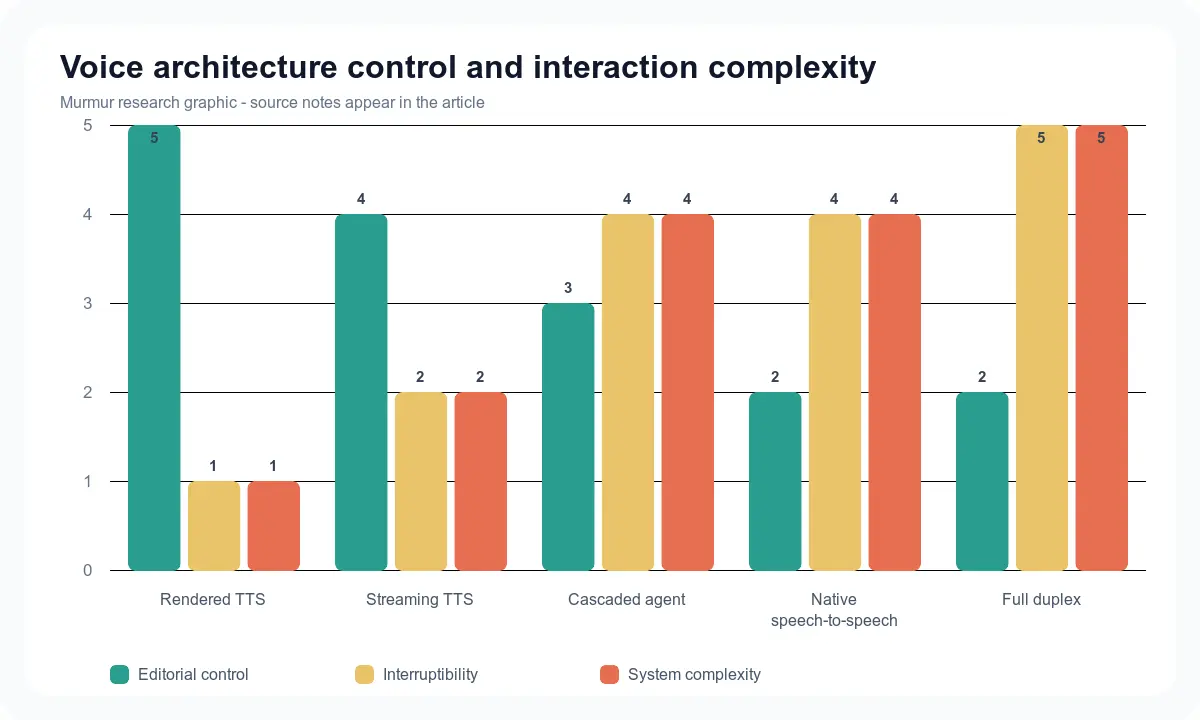
Four audio architectures that are often confused
| Architecture | Input | Output | Can user interrupt? | Creator control | Best use |
|---|---|---|---|---|---|
| Rendered TTS | Finished text or script | Audio file | Not relevant during generation | Highest | Narration, video, courses, authored games |
| Streaming TTS | Text chunks | Audio frames | Playback can be cancelled | High if text is approved | Live reading, generated answers, low-delay playback |
| Cascaded voice agent | Speech to STT to LLM to TTS | Streaming speech | Yes, with VAD and cancellation | Medium; transcript is inspectable | Support, assistants, NPC conversation |
| Native speech-to-speech | Audio and context | Audio | Provider-dependent | Lower transcript-level control | Expressive live conversation |
| Full-duplex voice AI | Continuous audio plus tools and context | Continuous audio | Core behavior | Interaction policy matters most | Natural overlapping conversation and live interpretation |
“Realtime” is not a single architecture. A rendered model can run faster than real time but still wait before playback. A streaming model can emit audio quickly while the conversation remains turn-based. A cascaded agent can support barge-in even though speech recognition, a language model, and TTS are separate. Ask what happens when the user coughs, says “stop,” pauses mid-sentence, or changes the request after three seconds of audio have already been buffered.
Rendered TTS remains the right tool for finished creative audio
A creator usually begins with approved text and ends with a file. They need pronunciation fixes, alternate takes, timing changes, music and sound effects, loudness control, review, and export. Pre-rendered TTS makes those steps visible. It also allows the producer to regenerate one line without rebuilding an interactive session. That control is more valuable than barge-in for an audiobook chapter or product video.
Local TTS adds privacy and predictable revision cost after setup. Murmur runs supported model workflows on an Apple Silicon Mac, then organizes scripts, speakers, takes, queueing, timeline editing, and WAV or M4A export. It does not attempt to be a telephone agent. The local model guide helps choose voices, and the blog-to-audio guide shows why script preparation and editing still matter after generation.
Streaming TTS solves delay without surrendering the script
Streaming TTS begins producing audio before all text is available. It works well when a language model emits a response clause by clause, when a reader starts a long document, or when a game needs to speak generated text. The application still controls the words. This makes moderation, captions, logging, and pronunciation more manageable than audio-native interaction.
The tradeoff is prosody across chunk boundaries. If the system sends “The result is” before learning the rest of the sentence, the voice cannot plan the full rhythm. Buffering more text improves phrasing but delays first audio. Cartesia’s official WebSocket TTS documentation advises sending spaces and punctuation for accuracy and prosody. Its context documentation exposes a maximum buffer delay, which makes the quality-versus-latency choice explicit.
Cascaded voice agents are easier to inspect and swap
A cascaded agent converts speech to text, sends text to a language model, then streams the answer through TTS. Each component can be replaced or optimized independently. Transcripts support search, debugging, captions, moderation, and analytics. The cost is accumulated latency and more handoffs. Each boundary can also lose tone, interruptions, or uncertainty carried in the original audio.
Cascaded systems can still feel responsive. They can run voice activity detection while TTS is playing, cancel output when the user speaks, start the language model on partial transcripts, and send complete clauses to streaming TTS. LiveKit’s turn-management documentation describes model-based turn detection, VAD, endpointing delays, noise cancellation, and adaptive interruption handling across both cascaded and realtime-model agents.
Full-duplex improves flow, but makes failures less obvious
A full-duplex system makes interaction decisions continuously. OpenAI says GPT-Live can listen while speaking, engage in quick exchanges, wait when the user needs time, and delegate deeper work while maintaining the conversation. At launch, the company says GPT-Live powers ChatGPT Voice and plans API availability later. That availability distinction matters: a product announcement is not an API integration you can ship today.
Continuous interaction creates new failure modes. A cough can cancel the answer. A polite “yeah” can be mistaken for a new request. The system may keep speaking over a correction or stop because it hears its own output. If it buffers too much generated audio, cancellation can arrive after unwanted speech is already queued. Debugging needs synchronized microphone frames, output frames, VAD events, turn decisions, transcripts where available, tool calls, and playback cancellation.
Turn-taking is the product
Hume’s official interruption documentation demonstrates the central tradeoff. Its minimum-interruption setting ranges from 50 to 2,000 milliseconds and defaults to 800 milliseconds. A low value yields quickly but reacts to noise and backchannels. A high value protects the response but can talk over a real interruption. There is no one correct threshold for a language tutor, crisis line, game character, and hands-free recipe assistant.
OpenAI’s Realtime API likewise exposes whether voice activity should automatically interrupt an ongoing response. LiveKit documents false interruptions and can resume after detected speech produces no actual transcript. These controls are not implementation trivia. They define whether the system feels attentive, rude, nervous, or slow.
| Behavior to test | Failure | Metric | Safer fallback |
|---|---|---|---|
| User pauses to think | Agent answers too early | False end-of-turn rate | Longer endpointing or push-to-talk |
| User says “stop” | Buffered audio keeps playing | Stop-to-silence time | Cancel playback queue locally |
| User says “mm-hm” | Agent abandons response | False interruption rate | Adaptive backchannel detection |
| Background speaker | Agent changes task | Wrong-speaker interruption rate | Noise reduction or speaker gating |
| Tool call takes five seconds | Dead air | Unacknowledged wait time | Short approved acknowledgement |
| Network or model fails | Conversation disappears | Recovery time | Text UI and retry control |
Which architecture fits common creator jobs?
| Job | Recommended starting point | Reason |
|---|---|---|
| YouTube narration | Rendered local TTS | Script approval, retakes, timeline sync, export |
| Audiobook or course | Rendered TTS with sentence or chapter queue | Long-form QA and reproducible files |
| Game story dialogue | Pre-rendered TTS | Direction, localization, lip sync, deterministic assets |
| Dynamic game NPC | Cascaded local agent plus streaming TTS | Inspectable text and modular performance tuning |
| Language tutor | Realtime or full-duplex voice | Interruptions, pronunciation exchange, live pacing |
| Customer support phone agent | Cascaded or native realtime agent | Turn-taking, tools, escalation, logging |
| Live interpretation | Full-duplex candidate | Continuous listening and speaking are central |
| Accessibility reader | Rendered or streaming TTS | Reliable reading controls matter more than open conversation |
Creators can combine these paths. A course app may use approved rendered lessons, streaming TTS for a generated summary, and a separate live tutor. A game may ship pre-rendered quest scenes and offer optional local NPC conversation. Do not force one architecture across every feature because the marketing term sounds newer.
Architecture checklist before you build
- Define whether the deliverable is a file, a live response, or an overlapping conversation.
- Write a maximum acceptable time to first audio and stop-to-silence time.
- Decide whether every spoken word needs an inspectable transcript before playback.
- Test pauses, backchannels, coughs, background speakers, echo, and quick corrections.
- Specify cancellation from model generation through the device playback buffer.
- Keep captions or text as a recovery path.
- Record model, voice, session, tool, and turn-decision events without storing sensitive audio unnecessarily.
- Estimate ongoing API or hardware cost at real session length and concurrency.
- Test safety and escalation for the actual domain.
- Use rendered local TTS for any approved line that does not benefit from live generation.
How to test full-duplex claims
- Ask a long question, pause halfway for 1.5 seconds, then finish it. Record whether the system answers early.
- Interrupt a long response with “stop” and measure milliseconds until the speaker becomes silent.
- Say “mm-hm” while the system talks. Check whether it continues or wrongly yields.
- Change the request after the first sentence and verify queued audio is cancelled.
- Run the same tests with café noise and a second nearby speaker.
- Trigger a five-second tool call and observe acknowledgement, dead air, and duplicate replies.
- Repeat for 10 minutes and log false starts, cutoffs, and recovery failures.
The media manifest turns these cases into a 100-second original video and a fixed audio script. Do not reuse a vendor’s polished demo as comparative evidence. Link to official demonstrations, then publish your own synchronized recording with model version, settings, network conditions, microphone, and timestamps.
Frequently asked questions
Choose the smallest interaction model that fits the job
Full-duplex voice AI is a meaningful advance for conversations that depend on listening while speaking. It does not replace the controlled, editable output of TTS. Start from the user interaction, not the architecture label. If you need finished creator audio on a Mac, browse Murmur voices and download Murmur for local scripts, takes, projects, timeline editing, and export. If you need a live agent, prototype turn behavior before choosing the voice.
Sources
- OpenAI GPT-Live announcementAccessed 2026-07-13
- OpenAI Realtime API referenceAccessed 2026-07-13
- Hume EVI interruption documentationAccessed 2026-07-13
- LiveKit turn-management documentationAccessed 2026-07-13
- Cartesia WebSocket TTS documentationAccessed 2026-07-13
- Full-Duplex-Bench-v3 paperAccessed 2026-07-13
Use local TTS when the deliverable is finished audio
Murmur costs $49 once and includes local model choices, voice workflows, scripts, alternate takes, queueing, projects, timeline editing, and WAV or M4A export. There is no free trial and purchases have a 7-day refund policy.
macOS 15+ · Apple Silicon required · 7-day refund policy