Can Local TTS Narrate 10,000 Words Without Breaking?
A reproducible local TTS endurance test for skipped text, repeated lines, pacing drift, voice consistency, crashes, speed, and export reliability.
 Murmur9 min read
Verdict: Local TTS can narrate 10,000 words, but a successful export is not the same as a correct narration. The reliable workflow splits the manuscript into reviewable sections, preserves exact source-to-audio mapping, checks the beginning, middle, and end, and regenerates only failed clips. For a paid audiobook, course, or client voiceover, require 100 percent script coverage, zero invented words, no unrepaired crashes, stable loudness, and an export you can reopen. Do not trust a polished 20-second demo as evidence of long-form stability. This guide provides a reproducible endurance test and pass criteria. It does not publish invented model rankings. Run the supplied protocol on your Mac and exact checkpoint, because model version, runtime, quantization, voice, punctuation, text normalization, and memory pressure can all change the result.
The 10,000-word test at a glance
| Metric | Publish threshold | How to measure | Why it matters |
|---|---|---|---|
| Script coverage | 100% after repairs | Align transcript to source and flag missing or extra text | Natural audio is unusable if it omits the argument |
| Unwanted words | 0 in final master | Listen and compare an automatic transcript with the source | Hallucinated speech can change facts or names |
| Voice identity | No obvious drift across checkpoints | Blind-listen to matched excerpts at 0%, 50%, and 100% | A narrator should sound like one person throughout |
| Pacing | No unexplained section-level jump over 10% | Compare words per minute by section | Pacing shifts are tiring and expose chunk boundaries |
| Crash recovery | No lost approved work | Quit, reopen, resume, and regenerate one failed clip | Long projects must survive interruption |
| Export integrity | Correct duration, order, channels, and file count | Reopen every deliverable and inspect boundaries | A good preview does not guarantee a good final file |
In this guide
- Why 10,000 words exposes failures that demos hide
- The fixed manuscript and test controls
- A step-by-step generation protocol
- How to score omissions, hallucinations, drift, speed, and recovery
- An audio sampling plan for beginning, middle, and end
- A publish or repair decision checklist
Why a 10,000-word local TTS test is different
Ten thousand English words usually produce roughly 60 to 80 minutes of finished narration at 125 to 165 words per minute. That is long enough to encounter headings, dialogue, abbreviations, names, numbers, parentheses, quotations, and paragraph transitions. It is also long enough for small errors to accumulate. A 0.5 percent omission rate sounds minor until it means 50 missing words. One skipped sentence can remove a safety warning, change an instruction, or break a story beat.
Long-form failure is usually a system problem rather than a single quality score. The model predicts speech, but the surrounding workflow normalizes text, chooses chunk boundaries, manages reference conditioning, writes files, names clips, restores projects, and combines audio. A model can sound excellent while the importer drops a heading. A runtime can generate every clip while the final join inserts silence or changes the order. Test the path from source document to reopened deliverable.
Build a fair test manuscript
Use one original or fully cleared manuscript for every model. Do not compare a news article on one system with a dramatic story on another. The Murmur test manuscript should be exactly 10,000 words after the same normalization rule is applied. Divide it into ten numbered sections of 1,000 words. Give each section a checksum or immutable text file so later edits do not silently invalidate the comparison.
The text should be ordinary enough to represent a real book, but varied enough to expose weak handling. Include at least 20 proper names, 20 numbers in mixed forms, 10 abbreviations, 10 quoted exchanges, 10 parenthetical phrases, 10 sentences containing semicolons or colons, and 5 web or email-like strings. Add repeated phrases in clearly marked places so the evaluator can distinguish a correct repetition from a model loop. Keep a pronunciation sheet for names and technical terms.
Use an original calibration passage
Place the same 118-word calibration passage at the beginning, midpoint, and end. The words stay identical, while the surrounding chapter context changes. This gives listeners three matched samples for voice identity, pitch, tempo, articulation, and noise. The media manifest for this article contains an original passage written for Murmur. It may be generated with each tested preset voice or with a clone made from a consenting speaker. Do not reuse a celebrity, game character, audiobook, or official model-demo voice.
Control the variables before generation
- Record the Mac model, chip, unified memory, free storage, macOS version, power mode, and whether other memory-heavy apps are open.
- Record the app or runtime version, model repository, exact checkpoint, precision or quantization, and local model-file checksum.
- Use the same text normalization, pronunciation substitutions, chunk size, pause rules, voice or reference clip, speed, and expressive settings.
- Generate to lossless WAV before making MP3 or M4A delivery files.
- Start from a cold launch for time-to-first-audio, then report steady-state generation separately.
- Disable automatic edits that differ between contestants, or document every intervention.
Model cards report capabilities under their own hardware and software conditions. For example, the official Qwen3-TTS Base card describes a 0.6B voice-cloning checkpoint and links its reference implementation. The official Chatterbox repository documents separate Turbo and Multilingual models, device options, reference-audio inputs, and model-specific controls. Those pages establish how to run each model. They do not establish how the same converted checkpoint performs for 10,000 words on your Mac.
Run the endurance test in seven stages
Stage 1: preflight 300 words
Generate a 300-word excerpt that contains one of every difficult feature. Fix predictable text-normalization and pronunciation issues before the timed run. Record those substitutions so every model receives equivalent help. If a model cannot complete the preflight without missing text, repeating a line, or producing unusable noise, stop and report a preflight failure instead of burning an hour on an invalid configuration.
Stage 2: generate ten 1,000-word sections
Generate the manuscript as ten reviewable sections, while allowing the runtime to make smaller internal chunks if needed. Keep section boundaries identical across models. Capture start time, end time, clip count, retries, warnings, and peak memory. Do not manually remove a bad clip during the first pass. Put repairs in a separate log so the reported completion rate remains honest.
Stage 3: verify script coverage
Transcribe the generated audio with one fixed speech-recognition model, then align that transcript to the source. Automatic alignment finds suspicious gaps and additions, but it is not the final judge because recognition systems make their own mistakes. A reviewer must listen to each flagged region while reading the source. Count missing words, invented words, substitutions, repeated text, truncated endings, and pronunciation errors separately. Publish raw counts per 1,000 source words.
Stage 4: listen for drift
Export the matched calibration passage from the beginning, midpoint, and end without loudness normalization. Randomize the labels and ask at least three listeners whether the voice identity, pace, pitch, energy, noise floor, or accent changes. Also measure duration and integrated loudness. Objective numbers do not replace listening, but they help locate a gradual shift that is hard to notice during a linear hour-long playback.
Stage 5: repair only the failed clips
Regenerate every failed passage without rebuilding approved sections. Track attempts and editing minutes. This is where a project workflow can beat a notebook even if the underlying model is identical. If a single error forces a complete chapter rerun, the system is expensive to use. If a replacement clip cannot match the surrounding voice, pace, and room tone, it is not a clean repair.
Stage 6: test recovery
Save and close the project after section six. Reopen it, confirm the source, clip order, voice assignment, approved takes, and export settings, then continue. Repeat once after a forced application quit using a duplicate test project. Do not endanger a real manuscript. A long-form tool passes recovery when previously approved audio remains available and the user can identify any incomplete work without reading logs.
Stage 7: export and reopen
Export the full master and the deliverables the project actually needs, such as separate clips, WAV, or M4A. Reopen each file in a second player or editor. Verify sample rate, channel count, duration, chapter or marker placement, clip order, head and tail padding, and peak level. Listen across every join with headphones. Keep the lossless master even if the delivery format is compressed.
Score failures without hiding repairs
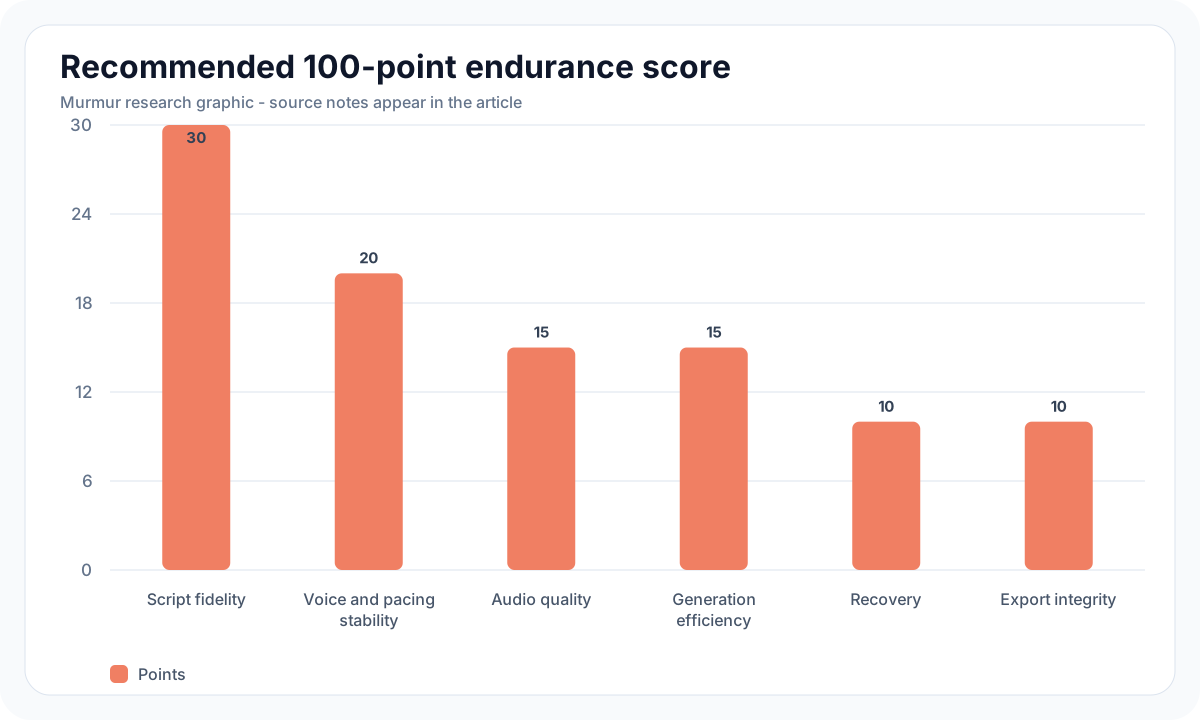
| Score area | Weight | Full-credit condition | Report beside the score |
|---|---|---|---|
| Script fidelity | 30 points | No omissions, additions, substitutions, or unwanted repeats after review | Raw error counts before and after repair |
| Voice and pacing stability | 20 points | Matched excerpts remain acceptably consistent | Blind listener notes and section WPM |
| Audio quality | 15 points | No clicks, clipping, unstable noise, or broken joins | Defect timestamps |
| Generation efficiency | 15 points | Competitive total time with disclosed hardware | Cold start, generation, repair, and editing time |
| Recovery | 10 points | Project resumes without losing approved work | Normal reopen and forced-quit outcome |
| Export integrity | 10 points | Every required deliverable reopens correctly | Formats, duration, and file count |
Publish both first-pass and repaired results. First-pass completion shows model and runtime stability. Repaired completion shows production feasibility. A tool that needs six targeted regenerations may still be practical if repairs are quick and consistent. A tool that needs one rerun but loses 45 minutes of approved work has a more serious workflow problem. Keep subjective naturalness as a separate listening score so it cannot conceal missing text.
How to choose a long-form local TTS setup
Start with the lightest model that meets the voice requirement. Kokoro is a practical preset-voice baseline because the official repository describes an 82 million parameter model under Apache 2.0. Qwen3-TTS Base is relevant when a consenting narrator must be cloned. Chatterbox adds expressive and multilingual options. Fish Audio S2 Pro offers large-model performance controls but requires a separate commercial license for commercial use. Read the local TTS model comparison before selecting test candidates.
Then choose the workflow. A command-line or Python stack is useful when you need full control, repeatable scripts, or a custom server. A voice studio is useful when humans must review scripts, compare alternate takes, replace failed lines, manage speakers, and export deliverables. The local voice studio versus DIY guide compares those choices. Murmur's Projects workflow is built around editable scripts, generated takes, a timeline, media lanes, markers, and export rather than one irreversible long render.
Publish or repair checklist
- Every source word is represented or an editorial omission is documented.
- No invented words, unwanted continuations, or accidental repeated lines remain.
- Names, numbers, abbreviations, and technical terms match the pronunciation sheet.
- The narrator remains acceptably consistent at the beginning, midpoint, and end.
- Repairs match adjacent clips in voice, pace, loudness, and spacing.
- The project survives close, reopen, and an isolated forced-quit test.
- Every final file reopens with the expected duration, order, channels, markers, and format.
- The selected model and voice are cleared for the intended commercial use.
- The benchmark report identifies hardware, versions, settings, retries, and human edits.
Frequently asked questions
A long render needs a repairable workflow
The honest answer to the 10,000-word question is conditional. A local model can produce an hour of fluent audio and still fail the manuscript. A production-ready setup proves fidelity, stability, recovery, and export with disclosed evidence. Use the same original text, keep the first-pass result, repair only failed clips, and publish the error counts beside the audio. That test is more useful than another hand-picked demo.
Turn long narration into editable local projects
Murmur gives Apple Silicon Mac creators local TTS, scripts, speakers, alternate takes, queueing, timeline editing, markers, and WAV or M4A export for $49 one-time. There is no free trial, and purchases include a 7-day refund window.
macOS 15+ · Apple Silicon required · 7-day refund policy