Local Voice Studio or DIY Open-Source Stack: Which Should You Choose?
Compare a local voice studio with a DIY open-source TTS stack by setup, model control, privacy, licensing, recovery, automation, and total production time.
 Murmur10 min read
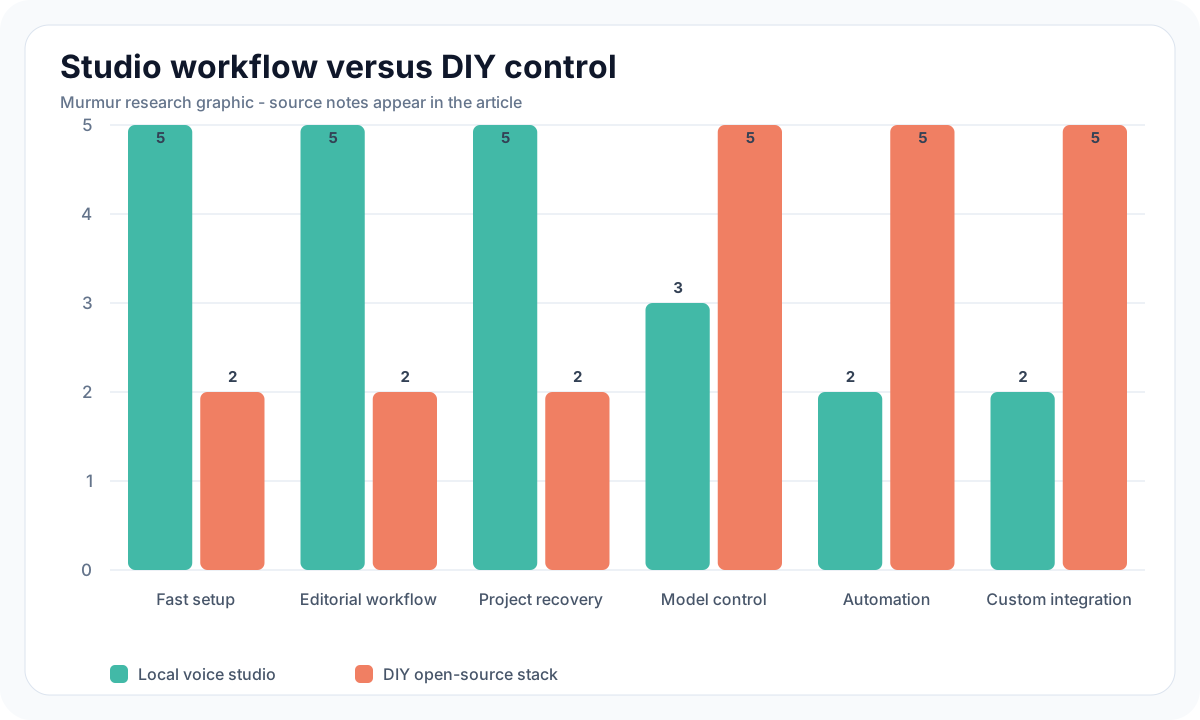
Quick verdict: Choose a local voice studio when your job is to finish narration, dialogue, courses, videos, or audiobooks without maintaining Python environments and custom project files. Choose a DIY open-source stack when model access, scripting, serving, custom preprocessing, or research control matters more than a polished editing workflow. The underlying model may be identical, so the deciding cost is usually human time: installation, version fixes, script chunking, retries, review, project recovery, and export. Murmur is the studio choice for Apple Silicon creators who want scripts, speakers, takes, queueing, a timeline, and WAV or M4A export in one $49 app. MLX-Audio and upstream model repositories are better for developers who need code-level access. Neither route removes model licenses, reference-voice consent, hardware limits, or quality control.
Local voice studio vs DIY at a glance
| Decision factor | Local voice studio | DIY open-source stack |
|---|---|---|
| Best fit | Creators shipping edited audio | Developers, researchers, and automation-heavy teams |
| First setup | App installation plus model downloads | Python, package manager, runtime, model, dependencies, and often ffmpeg |
| Model choice | Curated and tested integrations | Broadest access, including new or experimental checkpoints |
| Script workflow | Structured scripts, speakers, takes, and editable clips | Text files, notebooks, shell scripts, or a custom interface |
| Batch and automation | Built-in queue within product boundaries | Full scripting, API, server, and pipeline control |
| Recovery | Project state and UI-guided resume | Only as strong as your checkpoints, manifests, and error handling |
| Export | Production formats and project-aware deliverables | Whatever you build with audio libraries and encoders |
| Ongoing maintenance | Handled mostly by the app vendor | Owned by you, including dependency and model changes |
| Upfront software cost | Purchase or subscription, depending on the app | Often $0 in license fees, plus engineering and maintenance time |
In this comparison
- What each route actually includes
- Setup, model access, and Apple Silicon support
- Script editing, alternate takes, and long-form recovery
- Automation, privacy, and commercial licensing
- A realistic two-hour trial for both workflows
- Decision checklists for creators and developers
What counts as a local voice studio?
A local voice studio is a desktop application that wraps one or more speech models in a project workflow. It should do more than place a text box above a Generate button. The production value comes from importing and revising scripts, assigning voices, preserving alternate takes, organizing clips, recovering interrupted work, and exporting files that fit an editor or distribution platform. Core inference runs on the user's machine after setup, although activation, updates, model downloads, community assets, or diagnostics may still use a network connection.
Murmur is one example for Apple Silicon Mac. Its current product direction combines local TTS, authorized voice cloning, reusable Voice Design, multi-speaker projects, a generation queue, timeline clips, imported media lanes, markers, and WAV or M4A export. The app costs $49 once, has no free trial, and provides a seven-day refund policy. Read the Murmur Projects overview for the project surface and Murmur's audio samples for product-made examples.
What counts as a DIY open-source TTS stack?
A DIY stack starts with model code or a general speech runtime and adds the missing production pieces. On Apple Silicon, the MLX-Audio repository provides text-to-speech, speech-to-text, and speech-to-speech support built on Apple's MLX framework. A basic stack may include Python, a virtual environment, MLX-Audio or an upstream model package, model weights from Hugging Face, soundfile or torchaudio for WAV output, ffmpeg for compressed formats, and scripts for chunking, naming, retries, manifests, and joining clips.
Open source describes licensing, not product completeness. The official MLX repository provides an array framework designed for Apple Silicon. MLX-Audio builds speech inference around it. Individual model repositories then define checkpoints, controls, sample rates, language support, reference-audio requirements, and licenses. You still decide how a 30-page script becomes stable chunks, where approved clips live, how errors are retried, and how the final master is assembled.
Setup cost is mostly time
The DIY license fee can be zero while the first usable project still costs several hours. A Python package may install cleanly today and fail after an operating-system, compiler, PyTorch, tokenizer, or model-format change. Large model downloads can be interrupted. A checkpoint may assume CUDA even when the underlying model can run through another Apple Silicon conversion. A tutorial can target an older commit. These are normal engineering tasks, but creators should price them as work rather than calling the stack free.
A studio moves that work behind a supported interface. It can validate model downloads, present memory guidance, choose compatible conversions, and keep project state in one place. The trade is delayed access to brand-new upstream releases and less control over hidden defaults. A curated model catalog is valuable when compatibility matters. It is frustrating when you need a checkpoint or feature the app has not integrated.
Model access and control
DIY wins when the experiment requires a specific model commit, quantization, sampler, reference encoder, finetune, streaming server, or custom text frontend. The Chatterbox repository, for example, exposes separate Turbo and Multilingual paths plus reference-audio and generation controls. The Qwen3-TTS Base model card documents its exact checkpoint and upstream usage. A developer can pin versions, inspect code, log intermediate data, and create a service around those interfaces.
A studio wins when the team needs a reliable subset of controls. Most narration revisions are not research problems. They are requests such as "slow this sentence," "replace the pronunciation," "try the other voice," or "export each line separately." A visible project can make those changes reviewable by an editor who does not write Python. Before buying, confirm that the app exposes the controls your selected model actually needs. A polished interface is not useful if it locks away reference choice, language, speed, or take management.
Long-form scripts expose the workflow gap
A notebook can generate a paragraph in a few lines. A book chapter needs stable source IDs, sentence-aware chunking, a pronunciation list, retries, accepted takes, and an export order. Without a manifest, a regenerated clip can overwrite the wrong file. Without a project view, an editor can approve audio that no longer matches the latest script. Without recovery, a crash near the end can leave a folder full of files with no trustworthy completion state.
DIY teams can solve each problem well. Store immutable source segments in JSON, name output by stable IDs rather than line numbers, write generation metadata beside each WAV, make jobs idempotent, and build a validation step before joining audio. That system can become more reliable than any desktop app. It is also software that someone must design, test, document, and maintain. Use the 10,000-word local TTS endurance test to compare both routes with the same manuscript.
| Production task | Studio route | DIY route |
|---|---|---|
| Replace one failed sentence | Select the clip, create another take, preserve the original | Rerun the segment ID and update the approved-take manifest |
| Change a voice for one speaker | Reassign the speaker and regenerate affected lines | Update speaker configuration and identify every dependent segment |
| Resume after interruption | Reopen the project and inspect pending or failed work | Read the job log and rerun missing IDs idempotently |
| Export separate clips | Use a named export option | Copy or encode approved files with deterministic naming |
| Create a custom API | Unavailable unless the app provides one | Wrap the runtime in a local server with your own authentication and queue |
Automation is the strongest DIY argument
Choose DIY when speech generation is one stage inside a larger automated system. A game build may generate placeholder dialogue from localization files. An accessibility tool may synthesize incoming documents. A testing pipeline may render the same passage through 20 checkpoints. A local server may expose speech to several internal tools. Code makes these jobs repeatable and connects them to existing data. A desktop studio's queue cannot substitute for an API when no human should touch each item.
Automation also creates operational obligations. Limit file paths and input sizes. Authenticate any service that is reachable beyond localhost. Prevent arbitrary model loading from untrusted requests. Record who supplied reference audio and whether its consent covers the automated use. Cap concurrency to avoid memory pressure. Keep generation jobs reproducible and delete private inputs according to policy. Local inference reduces cloud exposure, but an insecure local API can still leak scripts or become a resource-exhaustion target.
Privacy depends on the complete data path
Both routes can keep core speech inference on the Mac after model setup. Check every network boundary rather than relying on the word local. Model downloads, license activation, crash reports, update checks, community voice catalogs, package managers, and hosted demos may make requests. A DIY stack can be isolated after dependencies are installed, but packages and model code must be trusted. A studio can present clearer permissions, but its vendor should explain activation and diagnostics. Test with a network monitor if the material is sensitive.
Reference audio deserves special handling because it can identify a person and may be reusable for cloning. Keep it outside public project folders, restrict access, document consent, and define deletion. Do not put client voices into a shared demo notebook or commit them to Git. A local app and a DIY script need the same governance. Read AI voice watermarking and commercial rights before using a cloned voice in paid work.
Licensing follows the model, not the interface
A $49 app purchase does not purchase every upstream model's commercial rights. A free repository does not guarantee them either. Kokoro and official Qwen3-TTS checkpoints use Apache 2.0. Chatterbox uses MIT. Fish Audio's March 2026 Research License requires a separate written agreement for commercial use. SparkTTS repository code and model weights have different terms, with the official weights carrying non-commercial restrictions. Check the exact checkpoint, conversion, runtime, reference recording, and voice consent for both routes.
Keep a model manifest beside the project. Record repository URL, checkpoint ID, commit or revision, download date, file checksum, code license, weights license, conversion source, and any attribution or notice. For a client delivery, state which voice was used and how it was authorized. The manifest makes later updates safer and prevents a permissive app license from being mistaken for a restricted model license.
Run the same two-hour trial
A fair comparison uses a real deliverable, not installation screenshots. Prepare a 1,000-word original script with two speakers, five difficult names, numbers, quoted dialogue, and one intentionally revised paragraph. Use the same model family and authorized voices where possible. Start a two-hour clock after the software or repository is selected, including setup and model download. Stop when a second person can reopen the project and find the final files.
- Install the app or create a clean virtual environment and pin dependencies.
- Download and verify the model, then record its license and revision.
- Import or parse the script and assign two voices.
- Generate all lines and record failures, retries, and elapsed time.
- Replace one sentence, create an alternate take, and change one pronunciation.
- Close and reopen the work, then confirm that a collaborator can identify approved audio.
- Export one full WAV, one compressed file, and separate speaker clips.
- Reopen every deliverable and compare it with the latest script.
Score setup minutes, human intervention, script coverage, repair time, recovery, export correctness, and the number of undocumented steps. For DIY, include time spent reading issues and fixing dependencies. For the studio, include time spent working around missing controls. Repeat the test after 30 days. The second run reveals whether the workflow is reusable or whether the first success depended on memory and luck.
Choose a local voice studio if
- The primary users are writers, editors, producers, or voice directors rather than developers.
- Projects contain multiple speakers, revisions, alternate takes, and imported media.
- A failed line must be replaced without rebuilding an entire chapter.
- The team needs visible recovery state and repeatable WAV, M4A, marker, transcript, or separate-clip exports.
- You prefer a curated model catalog and vendor-maintained compatibility.
- The app's one-time or subscription price is lower than the engineering time it replaces.
Choose a DIY open-source stack if
- You need an exact upstream checkpoint, custom quantization, finetune, sampler, or text frontend.
- Speech generation must run from code, a local API, CI, a game build, or a data pipeline.
- You can own dependency updates, security, manifests, retries, and project recovery.
- Your workflow needs a feature the available desktop apps do not expose.
- The same engineering investment will support many projects or users.
- You can test licenses and model behavior at the checkpoint level.
Frequently asked questions
Buy workflow or build infrastructure
A local voice studio and a DIY open-source stack can run the same speech model, yet produce very different working days. Buy the studio when the scarce resource is editorial time and the goal is a finished asset. Build the stack when code-level control, automation, or a unique model is the product advantage. Test both with the same two-speaker script, count every setup and repair minute, reopen the work, and inspect the final export. The cheaper route is the one that reliably delivers the job.
Choose the local studio route on Apple Silicon
Murmur combines local generation, authorized voice cloning, Voice Design, scripts, speakers, queueing, timeline editing, alternate takes, and WAV or M4A export for $49 one-time. There is no free trial, and purchases include a 7-day refund window.
macOS 15+ · Apple Silicon required · 7-day refund policy